PostgreSQL
오픈소스 RDBMS 기반의 PostgreSQL 데이터베이스 컴포넌트
PostgreSQL은 ORDBMS중 하나이며 무료로 제공되며 오라클(Oracle) 데이터베이스 시스템과 유사합니다. 한국에서는 잘 사용되지 않고 있으나 전세계적으로의 트렌드는 4위에 랭킹되어 있으며 작년, 전달대비 꾸준히 점유율이 증가하고 있는 DB입니다.
PostgreSQL이 가지는 장점은 다음과 같습니다.
- 강력한 기능에 액세스 지정 시간 복구, 미리 쓰기 로깅, 세분화된 액세스 제어, 테이블스페이스, 중첩된 트랜잭션, 온라인 백업, 다중 버전 동시성 제어 등의 기능 중에서 선택할 수 있습니다.
- 안정성 및 규정 준수 유니코드, 국가별 문자 집합, 멀티바이트 문자 인코딩을 지원합니다.
- PostgreSQL은 오픈 소스 라이선스입니다. PostgreSQL은 오픈 소스 라이선스로 액세스할 수 있으며 라이선스 비용이 없으므로 사용자는 어떤 식으로든 소스 코드를 수정하거나 구현할 수 있습니다.
- PostgreSQL의 확장성 스케일링 성능은 관리할 수 있는 데이터의 양뿐만 아니라 관리할 수 있는 동시 사용자 수에도 적용됩니다.
- 다양한 인덱스 형식 및 전체 텍스트 검색 문자열 검색 및 벡터 작업 문자열에 대한 전체 텍스트 검색 외에 B+ 트리 인덱스, 일반화된 반전 인덱스, 일반화된 검색 트리를 비롯한 다양한 인덱싱 기법을 제공합니다.
- 유연성 C, C++, Go, Perl, Python, Java, .Net, Ruby, ODBC, Tcl을 비롯한 가장 중요한 여러 프로그래밍 언어 및 프로토콜과 호환됩니다.
- 풍부한 지원 에코시스템 버그 및 의견을 주고 받는 커뮤니티가 잘 발달되어 있습니다.
- JSON 관계형 쿼리와 비관계형 쿼리를 모두 지원하므로 사용자는 SQL 및 JSON 경로 식을 사용하여 JSON 데이터에 액세스할 수 있습니다.
- 확장성 PostGIS, Citus, pg_cron, HyperLogLog, t-digest 등 사용할 수 있는 다양한 확장과 추가 기능을 사용할 수 있습니다.
Turaco에서는 드래그 & 드롭을 통해 몇가지 설정만으로 쿠버네티스 클러스터내에 PostgreSQL 구성할 수 있습니다.
본 챕터에서는 PostgreSQL 컴포넌트에 대해 설명합니다.
컴포넌트 배치
PostgreSQL 컴포넌트는 아키텍처 설계 화면 (이하 디자이너 화면)에서 좌측에 위치한 컴포넌트 목록에서 데이터베이스 카테고리에 있습니다.
- 설계화면 왼쪽 컴포넌트 리스트 화면에서 PostgreSQL 컴포넌트를 선택 후 디자이너 화면으로 드래그 & 드롭합니다.
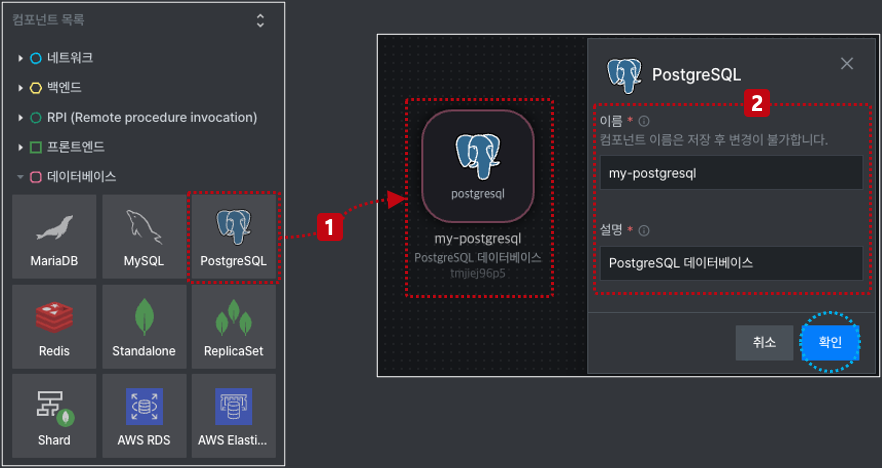
- 배치된 PostgreSQL 컴포넌트에 대한 이름과 설명을 입력 후 확인 버튼을 클릭합니다. 이름과 설명은 필수 입력값이며 입력하지 않으면 확인 버튼이 활성화되지 않습니다.
호스트
호스트 설정은 외부에 별도로 운영중인 PostgreSQL 데이터베이스가 이미 있는 경우, 해당 시스템을 사용하기 위한 옵션입니다.
외부에 이미 운영중인 시스템을 사용하기를 원할 경우, 해당 시스템에 대한 엔드포인트를 입력합니다.
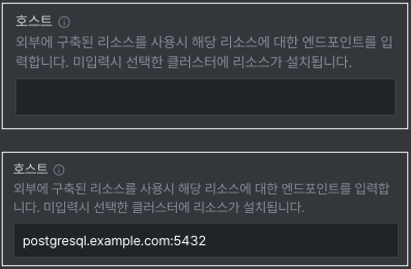
호스트 항목에 엔드포인트를 입력하면 설계 후 애플리케이션 생성시 PostgreSQL 생성을 위한 리소스가 생성되지 않습니다. 백엔드 코드에 호스트에 입력한 엔드포인트가 주입되어 생성됩니다.
환경 설정
Turaco에서는 데이터베이스 등과 같은 인스턴스를 생성할때 초기 환경값을 사용자가 수정해서 커스터마이징 할수 있게 지원하고 있습니다. 이러한 설정값을 지정하면, 애플리케이션 생성시 쿠버네티스의 ConfigMap 또는 Secret와 같은 리소스로 생성됩니다. 또한, 각 구성에 대한 기본값을 적용 후 사용자의 의도에 맞게 구성값을 변경할 수 있습니다.
환경 설정은 필수로 입력해야하며 아래와 같은 순서로 속성값을 지정합니다.
- 환경 설정 속성창에서 환경 설정 추가를 위한 버튼을 클릭합니다.클릭하게 되면 환경 설정을 위한 팝업창이 나타납니다.
- 환경 설정을 선택하기 위한 드롭다운 버튼을 클릭합니다.
- 드롭다운 메뉴에서 'Configuration' 항목을 선택합니다.
- 선택된 설정값을 가져오기 위해 '적용' 버튼을 클릭합니다.
- 선택된 값이 속성 창에 주입됩니다.
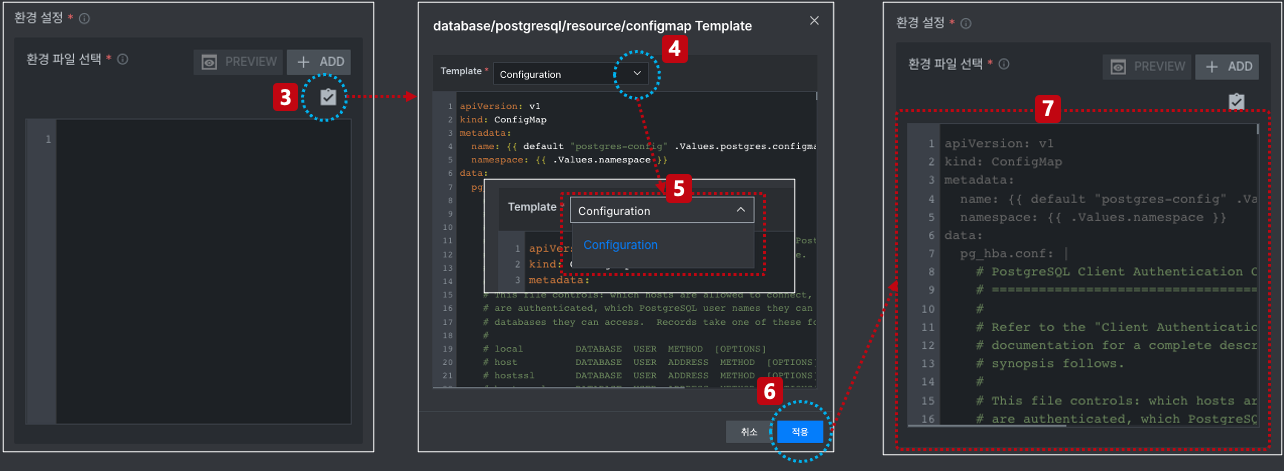
실행 환경 설정은 ConfigMap으로 제공되며 전체 항목은 다음과 같습니다.
apiVersion: v1
kind: ConfigMap
metadata:
name: {{ default "postgres-config" .Values.postgres.configmap.name }}
namespace: {{ .Values.namespace }}
data:
pg_hba.conf: |
# PostgreSQL Client Authentication Configuration File
# ===================================================
#
# Refer to the "Client Authentication" section in the PostgreSQL
# documentation for a complete description of this file. A short
# synopsis follows.
#
# This file controls: which hosts are allowed to connect, how clients
# are authenticated, which PostgreSQL user names they can use, which
# databases they can access. Records take one of these forms:
#
# local DATABASE USER METHOD [OPTIONS]
# host DATABASE USER ADDRESS METHOD [OPTIONS]
# hostssl DATABASE USER ADDRESS METHOD [OPTIONS]
# hostnossl DATABASE USER ADDRESS METHOD [OPTIONS]
# hostgssenc DATABASE USER ADDRESS METHOD [OPTIONS]
# hostnogssenc DATABASE USER ADDRESS METHOD [OPTIONS]
#
# (The uppercase items must be replaced by actual values.)
#
# The first field is the connection type:
# - "local" is a Unix-domain socket
# - "host" is a TCP/IP socket (encrypted or not)
# - "hostssl" is a TCP/IP socket that is SSL-encrypted
# - "hostnossl" is a TCP/IP socket that is not SSL-encrypted
# - "hostgssenc" is a TCP/IP socket that is GSSAPI-encrypted
# - "hostnogssenc" is a TCP/IP socket that is not GSSAPI-encrypted
#
# DATABASE can be "all", "sameuser", "samerole", "replication", a
# database name, or a comma-separated list thereof. The "all"
# keyword does not match "replication". Access to replication
# must be enabled in a separate record (see example below).
#
# USER can be "all", a user name, a group name prefixed with "+", or a
# comma-separated list thereof. In both the DATABASE and USER fields
# you can also write a file name prefixed with "@" to include names
# from a separate file.
#
# ADDRESS specifies the set of hosts the record matches. It can be a
# host name, or it is made up of an IP address and a CIDR mask that is
# an integer (between 0 and 32 (IPv4) or 128 (IPv6) inclusive) that
# specifies the number of significant bits in the mask. A host name
# that starts with a dot (.) matches a suffix of the actual host name.
# Alternatively, you can write an IP address and netmask in separate
# columns to specify the set of hosts. Instead of a CIDR-address, you
# can write "samehost" to match any of the server's own IP addresses,
# or "samenet" to match any address in any subnet that the server is
# directly connected to.
#
# METHOD can be "trust", "reject", "md5", "password", "scram-sha-256",
# "gss", "sspi", "ident", "peer", "pam", "ldap", "radius" or "cert".
# Note that "password" sends passwords in clear text; "md5" or
# "scram-sha-256" are preferred since they send encrypted passwords.
#
# OPTIONS are a set of options for the authentication in the format
# NAME=VALUE. The available options depend on the different
# authentication methods -- refer to the "Client Authentication"
# section in the documentation for a list of which options are
# available for which authentication methods.
#
# Database and user names containing spaces, commas, quotes and other
# special characters must be quoted. Quoting one of the keywords
# "all", "sameuser", "samerole" or "replication" makes the name lose
# its special character, and just match a database or username with
# that name.
#
# This file is read on server startup and when the server receives a
# SIGHUP signal. If you edit the file on a running system, you have to
# SIGHUP the server for the changes to take effect, run "pg_ctl reload",
# or execute "SELECT pg_reload_conf()".
#
# Put your actual configuration here
# ----------------------------------
#
# If you want to allow non-local connections, you need to add more
# "host" records. In that case you will also need to make PostgreSQL
# listen on a non-local interface via the listen_addresses
# configuration parameter, or via the -i or -h command line switches.
# CAUTION: Configuring the system for local "trust" authentication
# allows any local user to connect as any PostgreSQL user, including
# the database superuser. If you do not trust all your local users,
# use another authentication method.
# TYPE DATABASE USER ADDRESS METHOD
# "local" is for Unix domain socket connections only
local all all trust
# IPv4 local connections:
host all all 127.0.0.1/32 trust
# IPv6 local connections:
host all all ::1/128 trust
# Allow replication connections from localhost, by a user with the
# replication privilege.
local replication all trust
host replication all 127.0.0.1/32 trust
host replication all ::1/128 trust
host all all all scram-sha-256
postgres.conf: |
# -----------------------------
# PostgreSQL configuration file
# -----------------------------
#
# This file consists of lines of the form:
#
# name = value
#
# (The "=" is optional.) Whitespace may be used. Comments are introduced with
# "#" anywhere on a line. The complete list of parameter names and allowed
# values can be found in the PostgreSQL documentation.
#
# The commented-out settings shown in this file represent the default values.
# Re-commenting a setting is NOT sufficient to revert it to the default value;
# you need to reload the server.
#
# This file is read on server startup and when the server receives a SIGHUP
# signal. If you edit the file on a running system, you have to SIGHUP the
# server for the changes to take effect, run "pg_ctl reload", or execute
# "SELECT pg_reload_conf()". Some parameters, which are marked below,
# require a server shutdown and restart to take effect.
#
# Any parameter can also be given as a command-line option to the server, e.g.,
# "postgres -c log_connections=on". Some parameters can be changed at run time
# with the "SET" SQL command.
#
# Memory units: B = bytes Time units: us = microseconds
# kB = kilobytes ms = milliseconds
# MB = megabytes s = seconds
# GB = gigabytes min = minutes
# TB = terabytes h = hours
# d = days
#------------------------------------------------------------------------------
# FILE LOCATIONS
#------------------------------------------------------------------------------
# The default values of these variables are driven from the -D command-line
# option or PGDATA environment variable, represented here as ConfigDir.
#data_directory = 'ConfigDir' # use data in another directory
# (change requires restart)
#hba_file = 'ConfigDir/pg_hba.conf' # host-based authentication file
# (change requires restart)
#ident_file = 'ConfigDir/pg_ident.conf' # ident configuration file
# (change requires restart)
# If external_pid_file is not explicitly set, no extra PID file is written.
#external_pid_file = '' # write an extra PID file
# (change requires restart)
#------------------------------------------------------------------------------
# CONNECTIONS AND AUTHENTICATION
#------------------------------------------------------------------------------
# - Connection Settings -
listen_addresses = '*'
# comma-separated list of addresses;
# defaults to 'localhost'; use '*' for all
# (change requires restart)
port = {{ default "5432" .Values.statefulset.container.port }} # (change requires restart)
max_connections = 100 # (change requires restart)
#superuser_reserved_connections = 3 # (change requires restart)
#unix_socket_directories = '/var/run/postgresql' # comma-separated list of directories
# (change requires restart)
#unix_socket_group = '' # (change requires restart)
#unix_socket_permissions = 0777 # begin with 0 to use octal notation
# (change requires restart)
#bonjour = off # advertise server via Bonjour
# (change requires restart)
#bonjour_name = '' # defaults to the computer name
# (change requires restart)
# - TCP settings -
# see "man tcp" for details
#tcp_keepalives_idle = 0 # TCP_KEEPIDLE, in seconds;
# 0 selects the system default
#tcp_keepalives_interval = 0 # TCP_KEEPINTVL, in seconds;
# 0 selects the system default
#tcp_keepalives_count = 0 # TCP_KEEPCNT;
# 0 selects the system default
#tcp_user_timeout = 0 # TCP_USER_TIMEOUT, in milliseconds;
# 0 selects the system default
#client_connection_check_interval = 0 # time between checks for client
# disconnection while running queries;
# 0 for never
# - Authentication -
#authentication_timeout = 1min # 1s-600s
#password_encryption = scram-sha-256 # scram-sha-256 or md5
#db_user_namespace = off
# GSSAPI using Kerberos
#krb_server_keyfile = 'FILE:${sysconfdir}/krb5.keytab'
#krb_caseins_users = off
# - SSL -
#ssl = off
#ssl_ca_file = ''
#ssl_cert_file = 'server.crt'
#ssl_crl_file = ''
#ssl_crl_dir = ''
#ssl_key_file = 'server.key'
#ssl_ciphers = 'HIGH:MEDIUM:+3DES:!aNULL' # allowed SSL ciphers
#ssl_prefer_server_ciphers = on
#ssl_ecdh_curve = 'prime256v1'
#ssl_min_protocol_version = 'TLSv1.2'
#ssl_max_protocol_version = ''
#ssl_dh_params_file = ''
#ssl_passphrase_command = ''
#ssl_passphrase_command_supports_reload = off
#------------------------------------------------------------------------------
# RESOURCE USAGE (except WAL)
#------------------------------------------------------------------------------
# - Memory -
shared_buffers = 128MB # min 128kB
# (change requires restart)
#huge_pages = try # on, off, or try
# (change requires restart)
#huge_page_size = 0 # zero for system default
# (change requires restart)
#temp_buffers = 8MB # min 800kB
#max_prepared_transactions = 0 # zero disables the feature
# (change requires restart)
# Caution: it is not advisable to set max_prepared_transactions nonzero unless
# you actively intend to use prepared transactions.
#work_mem = 4MB # min 64kB
#hash_mem_multiplier = 1.0 # 1-1000.0 multiplier on hash table work_mem
#maintenance_work_mem = 64MB # min 1MB
#autovacuum_work_mem = -1 # min 1MB, or -1 to use maintenance_work_mem
#logical_decoding_work_mem = 64MB # min 64kB
#max_stack_depth = 2MB # min 100kB
#shared_memory_type = mmap # the default is the first option
# supported by the operating system:
# mmap
# sysv
# windows
# (change requires restart)
dynamic_shared_memory_type = posix # the default is the first option
# supported by the operating system:
# posix
# sysv
# windows
# mmap
# (change requires restart)
#min_dynamic_shared_memory = 0MB # (change requires restart)
# - Disk -
#temp_file_limit = -1 # limits per-process temp file space
# in kilobytes, or -1 for no limit
# - Kernel Resources -
#max_files_per_process = 1000 # min 64
# (change requires restart)
# - Cost-Based Vacuum Delay -
#vacuum_cost_delay = 0 # 0-100 milliseconds (0 disables)
#vacuum_cost_page_hit = 1 # 0-10000 credits
#vacuum_cost_page_miss = 2 # 0-10000 credits
#vacuum_cost_page_dirty = 20 # 0-10000 credits
#vacuum_cost_limit = 200 # 1-10000 credits
# - Background Writer -
#bgwriter_delay = 200ms # 10-10000ms between rounds
#bgwriter_lru_maxpages = 100 # max buffers written/round, 0 disables
#bgwriter_lru_multiplier = 2.0 # 0-10.0 multiplier on buffers scanned/round
#bgwriter_flush_after = 512kB # measured in pages, 0 disables
# - Asynchronous Behavior -
#backend_flush_after = 0 # measured in pages, 0 disables
#effective_io_concurrency = 1 # 1-1000; 0 disables prefetching
#maintenance_io_concurrency = 10 # 1-1000; 0 disables prefetching
#max_worker_processes = 8 # (change requires restart)
#max_parallel_workers_per_gather = 2 # taken from max_parallel_workers
#max_parallel_maintenance_workers = 2 # taken from max_parallel_workers
#max_parallel_workers = 8 # maximum number of max_worker_processes that
# can be used in parallel operations
#parallel_leader_participation = on
#old_snapshot_threshold = -1 # 1min-60d; -1 disables; 0 is immediate
# (change requires restart)
#------------------------------------------------------------------------------
# WRITE-AHEAD LOG
#------------------------------------------------------------------------------
# - Settings -
#wal_level = replica # minimal, replica, or logical
# (change requires restart)
#fsync = on # flush data to disk for crash safety
# (turning this off can cause
# unrecoverable data corruption)
#synchronous_commit = on # synchronization level;
# off, local, remote_write, remote_apply, or on
#wal_sync_method = fsync # the default is the first option
# supported by the operating system:
# open_datasync
# fdatasync (default on Linux and FreeBSD)
# fsync
# fsync_writethrough
# open_sync
#full_page_writes = on # recover from partial page writes
#wal_log_hints = off # also do full page writes of non-critical updates
# (change requires restart)
#wal_compression = off # enable compression of full-page writes
#wal_init_zero = on # zero-fill new WAL files
#wal_recycle = on # recycle WAL files
#wal_buffers = -1 # min 32kB, -1 sets based on shared_buffers
# (change requires restart)
#wal_writer_delay = 200ms # 1-10000 milliseconds
#wal_writer_flush_after = 1MB # measured in pages, 0 disables
#wal_skip_threshold = 2MB
#commit_delay = 0 # range 0-100000, in microseconds
#commit_siblings = 5 # range 1-1000
# - Checkpoints -
#checkpoint_timeout = 5min # range 30s-1d
#checkpoint_completion_target = 0.9 # checkpoint target duration, 0.0 - 1.0
#checkpoint_flush_after = 256kB # measured in pages, 0 disables
#checkpoint_warning = 30s # 0 disables
max_wal_size = 1GB
min_wal_size = 80MB
# - Archiving -
#archive_mode = off # enables archiving; off, on, or always
# (change requires restart)
#archive_command = '' # command to use to archive a logfile segment
# placeholders: %p = path of file to archive
# %f = file name only
# e.g. 'test ! -f /mnt/server/archivedir/%f && cp %p /mnt/server/archivedir/%f'
#archive_timeout = 0 # force a logfile segment switch after this
# number of seconds; 0 disables
# - Archive Recovery -
# These are only used in recovery mode.
#restore_command = '' # command to use to restore an archived logfile segment
# placeholders: %p = path of file to restore
# %f = file name only
# e.g. 'cp /mnt/server/archivedir/%f %p'
#archive_cleanup_command = '' # command to execute at every restartpoint
#recovery_end_command = '' # command to execute at completion of recovery
# - Recovery Target -
# Set these only when performing a targeted recovery.
#recovery_target = '' # 'immediate' to end recovery as soon as a
# consistent state is reached
# (change requires restart)
#recovery_target_name = '' # the named restore point to which recovery will proceed
# (change requires restart)
#recovery_target_time = '' # the time stamp up to which recovery will proceed
# (change requires restart)
#recovery_target_xid = '' # the transaction ID up to which recovery will proceed
# (change requires restart)
#recovery_target_lsn = '' # the WAL LSN up to which recovery will proceed
# (change requires restart)
#recovery_target_inclusive = on # Specifies whether to stop:
# just after the specified recovery target (on)
# just before the recovery target (off)
# (change requires restart)
#recovery_target_timeline = 'latest' # 'current', 'latest', or timeline ID
# (change requires restart)
#recovery_target_action = 'pause' # 'pause', 'promote', 'shutdown'
# (change requires restart)
#------------------------------------------------------------------------------
# REPLICATION
#------------------------------------------------------------------------------
# - Sending Servers -
# Set these on the primary and on any standby that will send replication data.
#max_wal_senders = 10 # max number of walsender processes
# (change requires restart)
#max_replication_slots = 10 # max number of replication slots
# (change requires restart)
#wal_keep_size = 0 # in megabytes; 0 disables
#max_slot_wal_keep_size = -1 # in megabytes; -1 disables
#wal_sender_timeout = 60s # in milliseconds; 0 disables
#track_commit_timestamp = off # collect timestamp of transaction commit
# (change requires restart)
# - Primary Server -
# These settings are ignored on a standby server.
#synchronous_standby_names = '' # standby servers that provide sync rep
# method to choose sync standbys, number of sync standbys,
# and comma-separated list of application_name
# from standby(s); '*' = all
#vacuum_defer_cleanup_age = 0 # number of xacts by which cleanup is delayed
# - Standby Servers -
# These settings are ignored on a primary server.
#primary_conninfo = '' # connection string to sending server
#primary_slot_name = '' # replication slot on sending server
#promote_trigger_file = '' # file name whose presence ends recovery
#hot_standby = on # "off" disallows queries during recovery
# (change requires restart)
#max_standby_archive_delay = 30s # max delay before canceling queries
# when reading WAL from archive;
# -1 allows indefinite delay
#max_standby_streaming_delay = 30s # max delay before canceling queries
# when reading streaming WAL;
# -1 allows indefinite delay
#wal_receiver_create_temp_slot = off # create temp slot if primary_slot_name
# is not set
#wal_receiver_status_interval = 10s # send replies at least this often
# 0 disables
#hot_standby_feedback = off # send info from standby to prevent
# query conflicts
#wal_receiver_timeout = 60s # time that receiver waits for
# communication from primary
# in milliseconds; 0 disables
#wal_retrieve_retry_interval = 5s # time to wait before retrying to
# retrieve WAL after a failed attempt
#recovery_min_apply_delay = 0 # minimum delay for applying changes during recovery
# - Subscribers -
# These settings are ignored on a publisher.
#max_logical_replication_workers = 4 # taken from max_worker_processes
# (change requires restart)
#max_sync_workers_per_subscription = 2 # taken from max_logical_replication_workers
#------------------------------------------------------------------------------
# QUERY TUNING
#------------------------------------------------------------------------------
# - Planner Method Configuration -
#enable_async_append = on
#enable_bitmapscan = on
#enable_gathermerge = on
#enable_hashagg = on
#enable_hashjoin = on
#enable_incremental_sort = on
#enable_indexscan = on
#enable_indexonlyscan = on
#enable_material = on
#enable_memoize = on
#enable_mergejoin = on
#enable_nestloop = on
#enable_parallel_append = on
#enable_parallel_hash = on
#enable_partition_pruning = on
#enable_partitionwise_join = off
#enable_partitionwise_aggregate = off
#enable_seqscan = on
#enable_sort = on
#enable_tidscan = on
# - Planner Cost Constants -
#seq_page_cost = 1.0 # measured on an arbitrary scale
#random_page_cost = 4.0 # same scale as above
#cpu_tuple_cost = 0.01 # same scale as above
#cpu_index_tuple_cost = 0.005 # same scale as above
#cpu_operator_cost = 0.0025 # same scale as above
#parallel_setup_cost = 1000.0 # same scale as above
#parallel_tuple_cost = 0.1 # same scale as above
#min_parallel_table_scan_size = 8MB
#min_parallel_index_scan_size = 512kB
#effective_cache_size = 4GB
#jit_above_cost = 100000 # perform JIT compilation if available
# and query more expensive than this;
# -1 disables
#jit_inline_above_cost = 500000 # inline small functions if query is
# more expensive than this; -1 disables
#jit_optimize_above_cost = 500000 # use expensive JIT optimizations if
# query is more expensive than this;
# -1 disables
# - Genetic Query Optimizer -
#geqo = on
#geqo_threshold = 12
#geqo_effort = 5 # range 1-10
#geqo_pool_size = 0 # selects default based on effort
#geqo_generations = 0 # selects default based on effort
#geqo_selection_bias = 2.0 # range 1.5-2.0
#geqo_seed = 0.0 # range 0.0-1.0
# - Other Planner Options -
#default_statistics_target = 100 # range 1-10000
#constraint_exclusion = partition # on, off, or partition
#cursor_tuple_fraction = 0.1 # range 0.0-1.0
#from_collapse_limit = 8
#jit = on # allow JIT compilation
#join_collapse_limit = 8 # 1 disables collapsing of explicit
# JOIN clauses
#plan_cache_mode = auto # auto, force_generic_plan or
# force_custom_plan
#------------------------------------------------------------------------------
# REPORTING AND LOGGING
#------------------------------------------------------------------------------
# - Where to Log -
#log_destination = 'stderr' # Valid values are combinations of
# stderr, csvlog, syslog, and eventlog,
# depending on platform. csvlog
# requires logging_collector to be on.
# This is used when logging to stderr:
#logging_collector = off # Enable capturing of stderr and csvlog
# into log files. Required to be on for
# csvlogs.
# (change requires restart)
# These are only used if logging_collector is on:
#log_directory = 'log' # directory where log files are written,
# can be absolute or relative to PGDATA
#log_filename = 'postgresql-%Y-%m-%d_%H%M%S.log' # log file name pattern,
# can include strftime() escapes
#log_file_mode = 0600 # creation mode for log files,
# begin with 0 to use octal notation
#log_rotation_age = 1d # Automatic rotation of logfiles will
# happen after that time. 0 disables.
#log_rotation_size = 10MB # Automatic rotation of logfiles will
# happen after that much log output.
# 0 disables.
#log_truncate_on_rotation = off # If on, an existing log file with the
# same name as the new log file will be
# truncated rather than appended to.
# But such truncation only occurs on
# time-driven rotation, not on restarts
# or size-driven rotation. Default is
# off, meaning append to existing files
# in all cases.
# These are relevant when logging to syslog:
#syslog_facility = 'LOCAL0'
#syslog_ident = 'postgres'
#syslog_sequence_numbers = on
#syslog_split_messages = on
# This is only relevant when logging to eventlog (Windows):
# (change requires restart)
#event_source = 'PostgreSQL'
# - When to Log -
#log_min_messages = warning # values in order of decreasing detail:
# debug5
# debug4
# debug3
# debug2
# debug1
# info
# notice
# warning
# error
# log
# fatal
# panic
#log_min_error_statement = error # values in order of decreasing detail:
# debug5
# debug4
# debug3
# debug2
# debug1
# info
# notice
# warning
# error
# log
# fatal
# panic (effectively off)
#log_min_duration_statement = -1 # -1 is disabled, 0 logs all statements
# and their durations, > 0 logs only
# statements running at least this number
# of milliseconds
#log_min_duration_sample = -1 # -1 is disabled, 0 logs a sample of statements
# and their durations, > 0 logs only a sample of
# statements running at least this number
# of milliseconds;
# sample fraction is determined by log_statement_sample_rate
#log_statement_sample_rate = 1.0 # fraction of logged statements exceeding
# log_min_duration_sample to be logged;
# 1.0 logs all such statements, 0.0 never logs
#log_transaction_sample_rate = 0.0 # fraction of transactions whose statements
# are logged regardless of their duration; 1.0 logs all
# statements from all transactions, 0.0 never logs
# - What to Log -
#debug_print_parse = off
#debug_print_rewritten = off
#debug_print_plan = off
#debug_pretty_print = on
#log_autovacuum_min_duration = -1 # log autovacuum activity;
# -1 disables, 0 logs all actions and
# their durations, > 0 logs only
# actions running at least this number
# of milliseconds.
#log_checkpoints = off
#log_connections = off
#log_disconnections = off
#log_duration = off
#log_error_verbosity = default # terse, default, or verbose messages
#log_hostname = off
#log_line_prefix = '%m [%p] ' # special values:
# %a = application name
# %u = user name
# %d = database name
# %r = remote host and port
# %h = remote host
# %b = backend type
# %p = process ID
# %P = process ID of parallel group leader
# %t = timestamp without milliseconds
# %m = timestamp with milliseconds
# %n = timestamp with milliseconds (as a Unix epoch)
# %Q = query ID (0 if none or not computed)
# %i = command tag
# %e = SQL state
# %c = session ID
# %l = session line number
# %s = session start timestamp
# %v = virtual transaction ID
# %x = transaction ID (0 if none)
# %q = stop here in non-session
# processes
# %% = '%'
# e.g. '<%u%%%d> '
#log_lock_waits = off # log lock waits >= deadlock_timeout
#log_recovery_conflict_waits = off # log standby recovery conflict waits
# >= deadlock_timeout
#log_parameter_max_length = -1 # when logging statements, limit logged
# bind-parameter values to N bytes;
# -1 means print in full, 0 disables
#log_parameter_max_length_on_error = 0 # when logging an error, limit logged
# bind-parameter values to N bytes;
# -1 means print in full, 0 disables
#log_statement = 'none' # none, ddl, mod, all
#log_replication_commands = off
#log_temp_files = -1 # log temporary files equal or larger
# than the specified size in kilobytes;
# -1 disables, 0 logs all temp files
log_timezone = 'Etc/UTC'
#------------------------------------------------------------------------------
# PROCESS TITLE
#------------------------------------------------------------------------------
#cluster_name = '' # added to process titles if nonempty
# (change requires restart)
#update_process_title = on
#------------------------------------------------------------------------------
# STATISTICS
#------------------------------------------------------------------------------
# - Query and Index Statistics Collector -
#track_activities = on
#track_activity_query_size = 1024 # (change requires restart)
#track_counts = on
#track_io_timing = off
#track_wal_io_timing = off
#track_functions = none # none, pl, all
#stats_temp_directory = 'pg_stat_tmp'
# - Monitoring -
#compute_query_id = auto
#log_statement_stats = off
#log_parser_stats = off
#log_planner_stats = off
#log_executor_stats = off
#------------------------------------------------------------------------------
# AUTOVACUUM
#------------------------------------------------------------------------------
#autovacuum = on # Enable autovacuum subprocess? 'on'
# requires track_counts to also be on.
#autovacuum_max_workers = 3 # max number of autovacuum subprocesses
# (change requires restart)
#autovacuum_naptime = 1min # time between autovacuum runs
#autovacuum_vacuum_threshold = 50 # min number of row updates before
# vacuum
#autovacuum_vacuum_insert_threshold = 1000 # min number of row inserts
# before vacuum; -1 disables insert
# vacuums
#autovacuum_analyze_threshold = 50 # min number of row updates before
# analyze
#autovacuum_vacuum_scale_factor = 0.2 # fraction of table size before vacuum
#autovacuum_vacuum_insert_scale_factor = 0.2 # fraction of inserts over table
# size before insert vacuum
#autovacuum_analyze_scale_factor = 0.1 # fraction of table size before analyze
#autovacuum_freeze_max_age = 200000000 # maximum XID age before forced vacuum
# (change requires restart)
#autovacuum_multixact_freeze_max_age = 400000000 # maximum multixact age
# before forced vacuum
# (change requires restart)
#autovacuum_vacuum_cost_delay = 2ms # default vacuum cost delay for
# autovacuum, in milliseconds;
# -1 means use vacuum_cost_delay
#autovacuum_vacuum_cost_limit = -1 # default vacuum cost limit for
# autovacuum, -1 means use
# vacuum_cost_limit
#------------------------------------------------------------------------------
# CLIENT CONNECTION DEFAULTS
#------------------------------------------------------------------------------
# - Statement Behavior -
#client_min_messages = notice # values in order of decreasing detail:
# debug5
# debug4
# debug3
# debug2
# debug1
# log
# notice
# warning
# error
#search_path = '"$user", public' # schema names
#row_security = on
#default_table_access_method = 'heap'
#default_tablespace = '' # a tablespace name, '' uses the default
#default_toast_compression = 'pglz' # 'pglz' or 'lz4'
#temp_tablespaces = '' # a list of tablespace names, '' uses
# only default tablespace
#check_function_bodies = on
#default_transaction_isolation = 'read committed'
#default_transaction_read_only = off
#default_transaction_deferrable = off
#session_replication_role = 'origin'
#statement_timeout = 0 # in milliseconds, 0 is disabled
#lock_timeout = 0 # in milliseconds, 0 is disabled
#idle_in_transaction_session_timeout = 0 # in milliseconds, 0 is disabled
#idle_session_timeout = 0 # in milliseconds, 0 is disabled
#vacuum_freeze_table_age = 150000000
#vacuum_freeze_min_age = 50000000
#vacuum_failsafe_age = 1600000000
#vacuum_multixact_freeze_table_age = 150000000
#vacuum_multixact_freeze_min_age = 5000000
#vacuum_multixact_failsafe_age = 1600000000
#bytea_output = 'hex' # hex, escape
#xmlbinary = 'base64'
#xmloption = 'content'
#gin_pending_list_limit = 4MB
# - Locale and Formatting -
datestyle = 'iso, mdy'
#intervalstyle = 'postgres'
timezone = 'Etc/UTC'
#timezone_abbreviations = 'Default' # Select the set of available time zone
# abbreviations. Currently, there are
# Default
# Australia (historical usage)
# India
# You can create your own file in
# share/timezonesets/.
#extra_float_digits = 1 # min -15, max 3; any value >0 actually
# selects precise output mode
#client_encoding = sql_ascii # actually, defaults to database
# encoding
# These settings are initialized by initdb, but they can be changed.
lc_messages = 'en_US.utf8' # locale for system error message
# strings
lc_monetary = 'en_US.utf8' # locale for monetary formatting
lc_numeric = 'en_US.utf8' # locale for number formatting
lc_time = 'en_US.utf8' # locale for time formatting
# default configuration for text search
default_text_search_config = 'pg_catalog.english'
# - Shared Library Preloading -
#local_preload_libraries = ''
#session_preload_libraries = ''
#shared_preload_libraries = '' # (change requires restart)
#jit_provider = 'llvmjit' # JIT library to use
# - Other Defaults -
#dynamic_library_path = '$libdir'
#extension_destdir = '' # prepend path when loading extensions
# and shared objects (added by Debian)
#gin_fuzzy_search_limit = 0
#------------------------------------------------------------------------------
# LOCK MANAGEMENT
#------------------------------------------------------------------------------
#deadlock_timeout = 1s
#max_locks_per_transaction = 64 # min 10
# (change requires restart)
#max_pred_locks_per_transaction = 64 # min 10
# (change requires restart)
#max_pred_locks_per_relation = -2 # negative values mean
# (max_pred_locks_per_transaction
# / -max_pred_locks_per_relation) - 1
#max_pred_locks_per_page = 2 # min 0
#------------------------------------------------------------------------------
# VERSION AND PLATFORM COMPATIBILITY
#------------------------------------------------------------------------------
# - Previous PostgreSQL Versions -
#array_nulls = on
#backslash_quote = safe_encoding # on, off, or safe_encoding
#escape_string_warning = on
#lo_compat_privileges = off
#quote_all_identifiers = off
#standard_conforming_strings = on
#synchronize_seqscans = on
# - Other Platforms and Clients -
#transform_null_equals = off
#------------------------------------------------------------------------------
# ERROR HANDLING
#------------------------------------------------------------------------------
#exit_on_error = off # terminate session on any error?
#restart_after_crash = on # reinitialize after backend crash?
#data_sync_retry = off # retry or panic on failure to fsync
# data?
# (change requires restart)
#recovery_init_sync_method = fsync # fsync, syncfs (Linux 5.8+)
#------------------------------------------------------------------------------
# CONFIG FILE INCLUDES
#------------------------------------------------------------------------------
# These options allow settings to be loaded from files other than the
# default postgresql.conf. Note that these are directives, not variable
# assignments, so they can usefully be given more than once.
#include_dir = '...' # include files ending in '.conf' from
# a directory, e.g., 'conf.d'
#include_if_exists = '...' # include file only if it exists
#include = '...' # include file
#------------------------------------------------------------------------------
# CUSTOMIZED OPTIONS
#------------------------------------------------------------------------------
# Add settings for extensions here
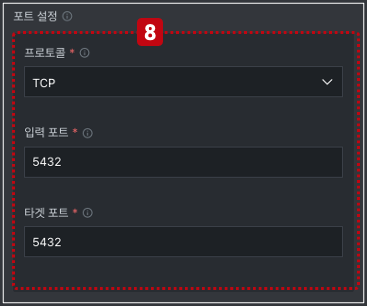
포트 설정
8. 포트 정보는 3가지 정보를 반드시 입력해야 합니다.
미 입력시 컨테이너 실행 후 정상적으로 접속이 되지 않을 수 있습니다.
스토리지
컨테이너는 로컬 스토리지를 사용할 수 있으나 컨테이너의 특성상 재시작되거나 삭제되는 경우 저장된 데이터가 같이 삭제됩니다. 이러한 특성 때문에 외부에 영구 볼륨을 설정하고 저장을 해야 데이터가 유실되지 않고 보관이 됩니다.
Turaco에서는 운영 환경에서 많이 사용하는 2가지 스토리지 클래스를 지원합니다.
- NFS 기반의 스토리지 클래스 (tlc-nfs-sc)
- Disk 기반의 스토리지 클래스 (tlc-block-sc)
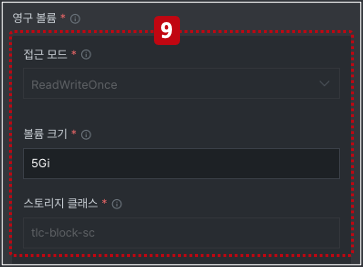
Turaco PostgreSQL 컴포넌트에서 스토리지 클래스 및 접근모드는 아래와 같이 고정값으로 지정되어 있으며 수정할 수 없습니다.
- 접근모드 -> ReadWriteOnce
- 스토리지 클래스 -> tlc-block-sc
9. 스토리지 설정에는 아래와 같이 3개의 속성이 있습니다. 접근 모드는 아래와 같이 3가지 속성이 있는데, PostgreSQL 컴포넌트에서는 고정(ReadWriteOnce)되어 있습니다.